Cyber Essentials renewal: what changes in year two, what lapses, and when to start
Short answer: Cyber Essentials renewal is a full new assessment every 12 months, answered against whichever question set is current when you open it. Your new certificate runs for 12 months from the day you submit, not from the day the old one expires. Plan as if there’s no grace period. If the date passes, you’re not certified until the new one is issued.
Most businesses get Cyber Essentials once, for a contract or an insurer. Eleven months later the renewal email arrives and nobody remembers how they answered the first time. That’s where year two goes wrong. The questionnaire has moved on, the office has changed, and the person who filled it in last year may not be there. This is the renewal guide we’d want to be handed: what’s different the second time, what quietly lapses if you miss the date, and when to actually start.
Renewal date coming up and not sure you’d pass today? Ring 0151 452 3060 and I’ll go through the questions that most often change between year one and year two, before you open the assessment.
How Cyber Essentials renewal actually works
There’s no separate “renewal form” and no shortened version for returning applicants. Cyber Essentials recertification is the same self-assessment you did the first time: you open a new assessment with your certification body, answer every question again, a director signs it off, and an assessor marks it. If it passes, you get a new certificate.
Three details matter more than people expect.
The question set is whatever’s current, not what you passed last year. Assessments opened after 27 April 2026 use version 3.3 of the requirements. If you certified in early 2026, you passed the old version and you’ll renew against the new one. IASME has also said further changes to the question set and marking are due later this year. Check which version your new assessment uses when you open it.
Once you open the Cyber Essentials assessment, you’ve got six months to finish it. That’s plenty of time, which is exactly why it’s tempting to open it, see a question you can’t answer, and leave it.
The new 12 months starts when you submit. IASME is explicit that the renewed certificate runs for 12 months from the date of submission, not from the expiry of the old one. Submit two months early and those two months come off the old certificate rather than being added to the new one. Submit two weeks late and you’ve spent two weeks uncertified.
The Cyber Essentials renewal timeline
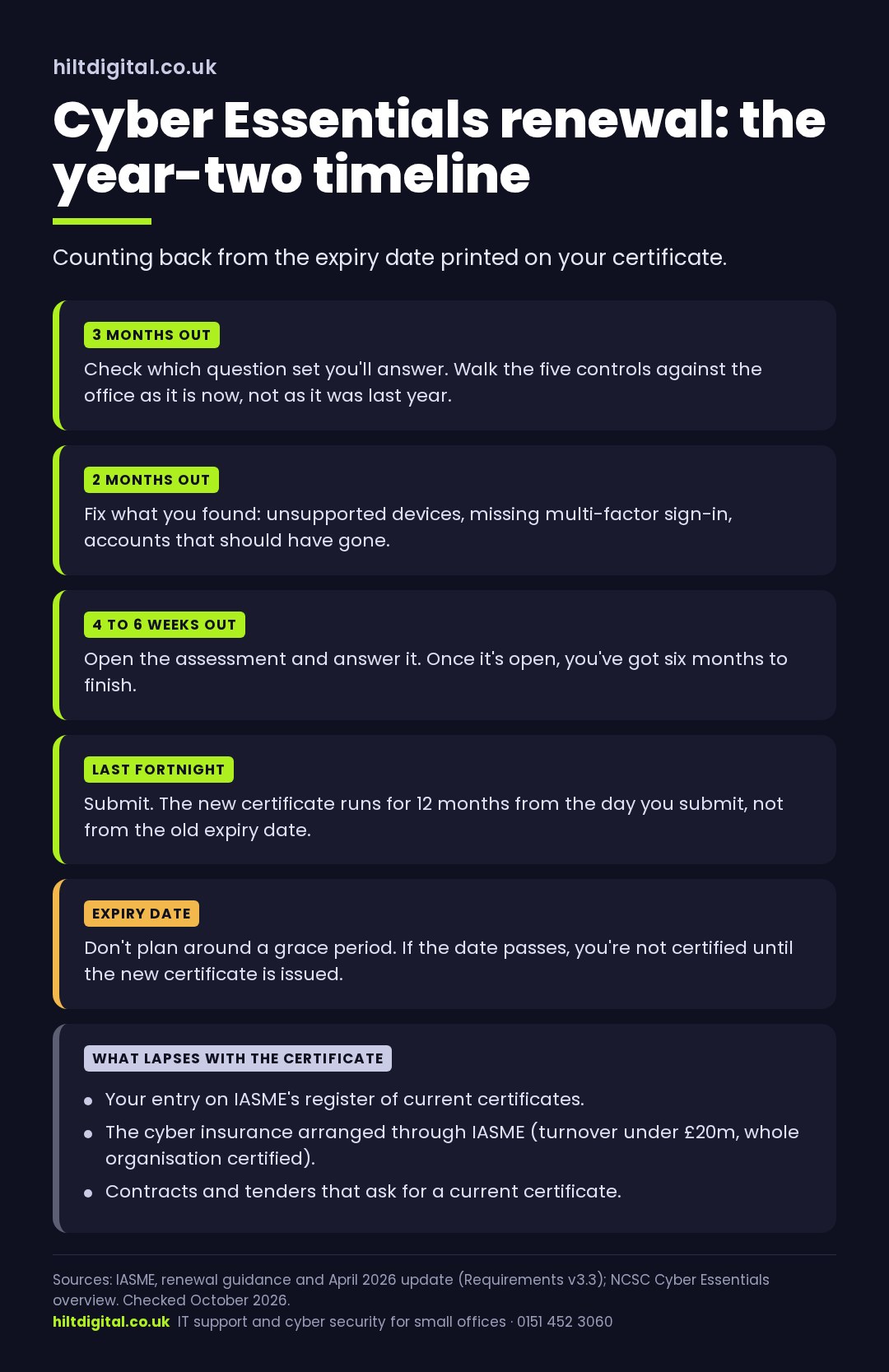
Counting back from the expiry date printed on your certificate:
- Three months out: check which question set you’ll be answering, and walk the five controls against the office as it is now, not as it was last year. This is where you find the laptop running something unsupported or the cloud tool without multi-factor sign-in, while there’s still time to fix it calmly.
- Two months out: fix what you found. Replacing a device or switching on multi-factor sign-in across a team takes days, not hours, once you allow for people being away.
- Four to six weeks out: open the assessment and answer it. You’ve got six months once it’s open, but you want the answers done with a few weeks to spare in case the assessor comes back with questions.
- The last fortnight: submit. Close enough to the expiry date that you don’t throw months away, far enough from it that a query from the assessor doesn’t push you past it.
If you’re planning a Cyber Essentials Plus renewal too, that needs a current basic certificate behind it, so the two dates are linked. Book the Plus audit with your certification body when you plan the basic Cyber Essentials recertification, not after.
What changes in year two
The five Cyber Essentials controls haven’t changed: firewalls, secure configuration, user access control, malware protection and security updates. What changes is your office. A year is long enough for all of these to drift, and the renewal is where they get found.
- New devices nobody set up properly. The laptop bought in a hurry for a new starter, the second-hand PC in the back office, the tablet on reception. Every device that touches business data is in scope for Cyber Essentials.
- Software that’s gone out of support. Unsupported software is a fail, and that includes Windows 10. There’s no workaround to rely on here: if a machine in scope is on Windows 10, it needs replacing or upgrading before you renew.
- Cloud tools someone signed up to. A new CRM, a file-sharing app, a scheduling tool. Under version 3.3 cloud services can’t be left out of scope, and if a service offers multi-factor sign-in and it isn’t on for everyone, that’s an automatic fail. Only 40% of UK businesses use multi-factor sign-in on email (DSIT 2025), so this is the question that catches most renewals out.
- Phones. Staff phones that get business email, including personal ones, are in scope. They need a supported operating system, a screen lock and updates.
- Accounts that should have gone. Leavers who still have a login, a shared admin account everyone knows the password to, a supplier’s access that was meant to be temporary. User access control is about who can get in today, not who was meant to.
- Updates that stopped happening. High-risk and critical security updates need to be on within 14 days of release. That includes the router and firewall, which tend to get forgotten because nobody logs into them.
None of that is a new requirement. It’s the ordinary churn of a year in a small office, and it’s why a Cyber Essentials renewal is harder than it looks when you remember passing last time. The full list of what moved in April is in what changed in Cyber Essentials for 2026.
Want those six things checked before you open the assessment? Our managed cyber security service is run to Cyber Essentials standards all year, so renewal becomes gathering the evidence rather than finding the gaps. Or request a free health check and see where you stand first.
What lapses if you miss your Cyber Essentials renewal date
A Cyber Essentials certificate expires on the date printed on it. There’s no badge left to display and no “renewal in progress” status you can point to. What goes with it:
- Your entry on the public register. IASME’s certificate search lists current certificates. Anyone checking you, a customer, a procurement team, an insurer, sees that you’re not on it.
- The cyber insurance that came with it. UK organisations with a turnover under £20m that certify their whole organisation are entitled to cyber liability insurance arranged through IASME. It’s tied to holding the certificate.
- Anything a contract made conditional on it. If a customer, a tender or a framework asks for a current Cyber Essentials certificate, an expired one doesn’t count, however recently it ran out. A late recertification doesn’t backdate it either.
- The answer on your insurance renewal. If your cyber insurer asked whether you hold Cyber Essentials and you said yes, check what you’ve told them before the date passes. More on that in what cyber insurers now ask for.
On grace periods: some providers have written about a 30-day window introduced in 2026. We couldn’t find it in IASME’s own published guidance, so don’t plan around one. Treat the expiry date as the date.
Cyber Essentials renewal cost
The Cyber Essentials assessment fee is set by the size of your organisation. It starts at £320 plus VAT for the smallest businesses and rises through the bands for larger ones. There’s no discount for renewing: you pay the assessment fee every year, because it’s a new assessment every year.
Cyber Essentials Plus is priced separately, quoted by your certification body on the size and complexity of your network, and it renews every year too.
The fee is rarely the expensive part. The real cost of a Cyber Essentials renewal is whatever you have to fix to pass: a laptop to replace, a licence that includes the security features you need, a weekend of somebody’s time chasing multi-factor sign-in across the team. That cost is lowest when it’s spotted three months out and highest when it’s spotted the week the certificate expires.
Cyber Essentials Plus renewal
Plus checks the same five controls. The difference is that an assessor tests them on a sample of your actual devices, rather than taking the questionnaire at its word. It needs a current basic certificate alongside it, and it’s renewed annually like the basic one.
Two things make a Plus renewal smoother. First, plan both dates together, because the Plus audit leans on the basic certificate being current. Second, assume the assessor will sample the devices you’d least like them to: the oldest laptop, the phone that never updates, the PC in the corner. If those pass, the rest will.
Renewing Cyber Essentials when you run your own IT
You don’t need a provider for Cyber Essentials recertification. Plenty of small businesses do it themselves, and the questionnaire is written for that. What makes it hard isn’t the questions, it’s that the answers live in a dozen places: the router admin page, the Microsoft 365 admin centre, every laptop’s update history, the list of who’s got a login to what.
If somebody in the office owns that list all year, renewal takes an afternoon. If nobody does, it takes the fortnight before the deadline and usually turns up something that needs buying. Whoever does it, write down where each answer came from this time. Next year’s renewal starts with that note.
A Cyber Essentials renewal checklist
- What’s the expiry date on the current certificate, and who has it in their diary three months before?
- Which Cyber Essentials question set will the renewal use?
- Is every device that touches business data on a supported operating system, including phones?
- Is multi-factor sign-in switched on for every user on every cloud service that offers it?
- Have leavers’ accounts and temporary supplier access been removed?
- Are security updates going on within 14 days, router and firewall included?
- If you hold Plus, is the audit booked to line up with the basic renewal?
- Have you checked what your insurer and your customers have been told about your certificate?
Cyber Essentials renewal: common questions
Is there a grace period for Cyber Essentials renewal?
Plan as if there isn’t. The certificate is valid until the date printed on it. We couldn’t find a grace period in IASME’s own guidance, whatever you may have read elsewhere.
Can I renew Cyber Essentials early?
Yes, but the new certificate runs for 12 months from the day you submit, so renewing early shortens the year you’ve already paid for. Aim to submit in the last couple of weeks before expiry.
Do I have to answer every question again?
Yes. Cyber Essentials recertification is a full new assessment, against the current question set, signed off by a director. Keep last year’s answers to hand as a reference, but don’t copy them: the office has changed and some of the questions have too.
How much does Cyber Essentials renewal cost?
The same as the first time: a size-based assessment fee from £320 plus VAT, with no renewal discount. Plus is quoted separately. The bigger cost is usually whatever needs fixing to pass.
What happens if we fail the renewal?
Your certification body tells you which answers didn’t meet the standard. The quickest fixes are usually switching on multi-factor sign-in and replacing or upgrading unsupported devices. That’s the reason to start three months out: a failed question with time left is a to-do item, not a lapsed certificate.
We’ve never had Cyber Essentials. Is this the right page?
Not quite. Getting certified for the first time, step by step, is covered in our Cyber Essentials guide for Liverpool, Chester and Cheshire.
Where to start
Find your certificate, look at the expiry date, and count back three months. If that date has already passed, the job for this week is the six checks in “what changes in year two”. Everything else in a Cyber Essentials renewal is paperwork once those are right.
Ring 0151 452 3060 and a person picks up. If your renewal looks straightforward, I’ll say so and you can get on with it. If you’d rather start with a picture of where you stand, request a free health check.