What is Microsoft Entra ID? A plain guide for UK small businesses
Short answer: Microsoft Entra ID is the sign-in system behind Microsoft 365. It’s the new name for Azure Active Directory (Azure AD), and if your business pays for Microsoft 365, you already have Microsoft Entra ID. It decides who can sign in, to what, and how they prove it’s them.
Most of what’s written about Entra ID is for IT departments in big organisations. This is for the office of five to fifty people that’s seen the name on a Microsoft email or a login screen. What is it, which version have you got, and is it set up properly?
Not sure how yours is set up? Ring 0151 452 3060 and I’ll talk you through what to look at. Setting up and running Entra ID is part of our small business IT support.
What is Microsoft Entra ID?
Every time someone at your business signs in to Outlook, Teams, OneDrive or SharePoint, Microsoft Entra ID is what checks them. It holds the list of your users, their passwords and their two-step sign-in methods, and it decides what each person can open.
It does a few jobs most businesses never think about:
- Accounts. Adding a new starter, switching off a leaver, resetting a forgotten password.
- Two-step sign-in. The code or app prompt after the password. Microsoft calls it multifactor authentication, or MFA.
- Single sign-on. One work login for other apps, like an accounts package or a CRM, instead of a separate password for each.
- Sign-in records. When and roughly where each account was signed in to, which is how you spot someone else using it.
- Rules about access. On the higher editions, rules such as “only from company laptops” or “never from outside the UK”.
You manage Entra ID in the Microsoft Entra admin centre at entra.microsoft.com, and some of it from the Microsoft 365 admin centre too.
Entra ID, EntraID and Azure AD: are they the same thing?
Yes. Microsoft announced on 11 July 2023 that Azure Active Directory would be renamed Microsoft Entra ID. The new name appeared on licences and in the admin screens from the autumn of 2023. Nothing else changed. Microsoft’s own guidance says licensing, pricing and features stayed the same, and the login addresses didn’t move.
People search for it as “Entra ID”, “EntraID” or “Microsoft Entra”. They all mean the same service. “Microsoft Entra” on its own is the wider family of Microsoft’s identity products; Microsoft Entra ID is the one that runs your sign-ins.
One thing that did not get renamed is Active Directory on a Windows server. If you’ve still got a server in the cupboard that handles logins in the office, that’s a different product. More on that below.
Which version of Microsoft Entra ID have you got?
You don’t buy Entra ID separately as a small business. It comes with your Microsoft 365 plan, and the plan decides the edition.
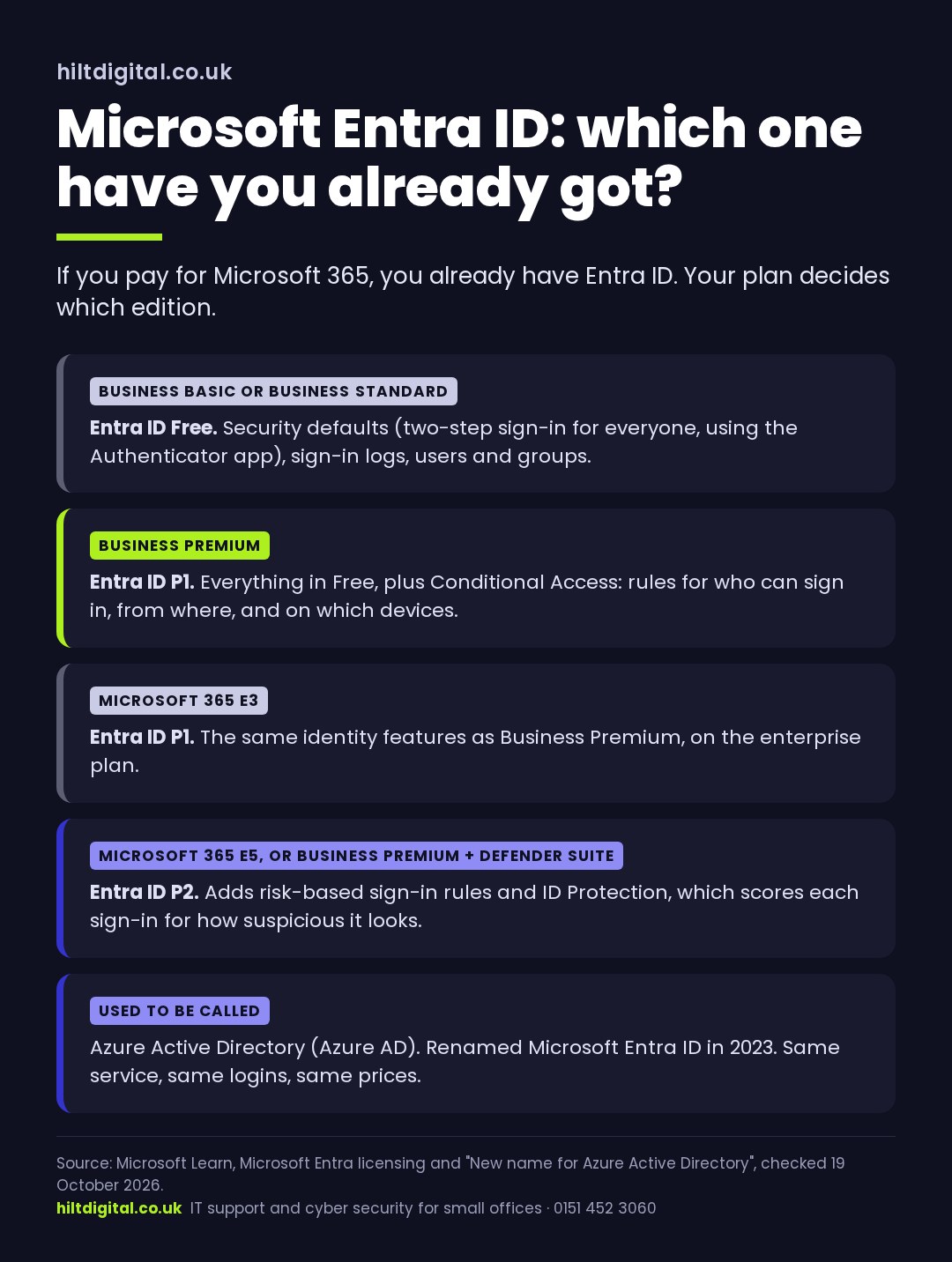
Business Basic or Business Standard: Entra ID Free. That’s more useful than the name suggests. It includes security defaults, which switch on two-step sign-in for everyone, and it keeps sign-in records.
Business Premium: Entra ID P1. P1 adds Conditional Access, which is where you set your own rules about who can sign in, from where and on what. Business Premium is the plan we recommend for any business holding client data, and this is a big part of why.
P2 comes with the enterprise E5 plan, or as part of Microsoft’s Defender Suite add-on for Business Premium. It adds risk scoring on every sign-in. Most offices of five to fifty don’t need it.
To check which plan you’ve got, look in the Microsoft 365 admin centre under Billing, then Your products. Or ask whoever set it up.
What Entra ID Free gives you, and what it doesn’t
The most important part of Entra ID Free is security defaults. Turned on, they:
- make every user register for two-step sign-in with the Microsoft Authenticator app
- make admins use two-step sign-in every time
- block old sign-in methods that can’t do two-step at all
That last one matters more than it sounds. Old email methods let an attacker try a stolen password without ever being asked for a code. Security defaults shut that door.
The limits of Entra ID Free: it’s all or nothing. You can’t say “except the shared reception PC” or “only from the office”. Only the Authenticator app works as the second step, so staff who won’t put it on their own phone are a problem. And there’s no Conditional Access.
Only 40% of UK businesses use two-step sign-in on email (DSIT Cyber Security Breaches Survey 2025). If your business is on Business Basic or Standard and security defaults are off, turning them on is the single most useful thing you can do in Entra ID this week.
Do you need Microsoft Entra ID P1?
It’s the question small businesses ask once they’ve found Entra ID, and it comes up on Microsoft’s own forums. The answer depends on what you hold and how you work.
You can manage on Entra ID Free if you’re a small team, everyone signs in from company laptops in one office, and security defaults are on and working.
You’ll want P1 (usually by moving to Business Premium) if any of these are true:
- You hold client data that an insurer, a regulator or a client’s questionnaire asks about.
- Staff sign in from home, from their own phones or on the road.
- You need exceptions, like a shared device or a scanner that can’t do two-step.
- You want sign-ins from abroad, or from devices you don’t manage, blocked outright.
Business Premium also brings the device management and protection that make those rules worth having. In a small office, Conditional Access usually means three rules. Two-step sign-in for everyone, with no exceptions you haven’t chosen. Company data only on devices you look after. Old sign-in methods blocked for good.
Want to know if Business Premium is worth it for you? Our small business IT support is £55 a person a month, and that covers setting up and running Entra ID, device management, two-step sign-in and account-takeover alerts. You buy the Microsoft licences direct from Microsoft; we manage them. Ring 0151 452 3060.
Three things to check in Microsoft Entra ID this week
None of these needs P1. They need someone with an admin login and about ten minutes.
1. Are security defaults on? In the Microsoft Entra admin centre, go to Entra ID, then Overview, then Properties, and select Manage security defaults. If you’re on Business Basic or Standard and it says Disabled, that’s the first job. Check first that nothing old relies on basic email sign-in, like a scanner that emails documents, because that will stop working.
2. How many people are Global Administrators? These accounts can change everything. You want very few, each with two-step sign-in, and not used for day-to-day email. Microsoft also recommends two separate emergency admin accounts kept for the day everyone else is locked out.
3. Look at the sign-in logs. They’re in Entra ID Free too. Any sign-ins from a country your team hasn’t been to, or at 4am, are worth a question that morning, not next week.
Entra ID and the Active Directory on your server
If your office has a Windows server that handles logins to the PCs, that’s Active Directory, and it’s a separate thing from Microsoft Entra ID. Some businesses run both, linked by a tool called Microsoft Entra Connect, so staff have one password for both.
That’s worth knowing now, because Windows Server 2016 stops getting security updates on 12 January 2027. Plenty of the servers running Active Directory in small offices are that version. For a lot of businesses, the replacement isn’t a new server: it’s moving logins and devices fully into Entra ID and managing laptops from the cloud. Which route is right depends on what else the server does.
What Hilt Digital does with Entra ID
We set up and run Microsoft Entra ID as part of looking after your IT. That means security defaults or Conditional Access set up properly, and two-step sign-in on every account. Admin accounts are kept to a minimum and leavers are switched off on the day. Sign-ins are watched, and the account is locked automatically when a takeover looks likely.
I’ve spent twenty years in IT, much of it inside NHS mental health services, where who can open what matters a great deal. Small offices need the same principles, set up in a way that doesn’t get in the way of work.
Microsoft Entra ID: questions people ask
Is Microsoft Entra ID free?
Entra ID Free comes with every Microsoft 365 subscription at no extra cost. P1 and P2 cost more, either as part of a bigger Microsoft 365 plan (Business Premium includes P1) or on their own.
Is EntraID the same as Azure AD?
Yes. Azure Active Directory was renamed Microsoft Entra ID in 2023. Same service, same logins, same prices.
Where do I log in to Entra ID?
Admins manage it at entra.microsoft.com. Staff don’t log in to Entra ID directly; they sign in to Outlook, Teams or office.com, and Entra ID does the checking behind the scenes.
Does Business Premium include Entra ID P1 or P2?
P1. P2 comes with Microsoft 365 E5, or with the Defender Suite add-on for Business Premium.
What’s the difference between Entra ID and Active Directory?
Active Directory runs on a Windows server in your office. Microsoft Entra ID runs in Microsoft’s cloud and handles Microsoft 365 sign-ins. They can be linked with Microsoft Entra Connect.
Do security defaults cost anything?
No. They’re available to every Microsoft 365 business at no extra cost, and Microsoft now switches them on for new tenants when they’re created.
Where to start
Check whether security defaults are on, then decide whether Business Premium is worth it for how you work. If you’d rather someone looked with you, that’s a normal first conversation.
Ring 0151 452 3060 and a person picks up, or see what’s included in our small business IT support.
Written and checked by Hilt Digital against Microsoft’s own documentation, October 2026.