Ransomware Protection for Small Offices in Cheshire, the Wirral and Liverpool
Ransomware protection for a small office in Cheshire, the Wirral or Liverpool doesn’t need a security operations centre or a jargon-filled proposal. It needs five things done properly and checked every day: sign-in security, email filtering, threat detection on every machine, updates on a schedule, and a backup that ransomware can’t reach. This is what each one does, what it costs, and the questions to ask whoever looks after your IT now.
Want it sorted rather than read about? Ransomware protection is built into our IT support at £55 a person a month. Ring 0151 452 3060 and a person picks up, or read the whole offer first.
How ransomware gets into a small business
Ransomware is software that encrypts your files and demands payment to unlock them. Most attacks on small businesses in Cheshire and Merseyside don’t start with anything clever. They start in the inbox, with a reused password, or with something left unpatched:
- A phishing email. Somebody opens an attachment or types their password into a fake Microsoft sign-in page. 85% of attacks on UK businesses start with phishing (DSIT 2025).
- A password that’s been used before. A staff password leaked from another website gets tried against your Microsoft 365 or remote access, and works because there’s no second step.
- Something left unpatched. An old router, an out-of-support server or remote access left open to the internet.
Once they’re in, attackers often wait. They look for the backups, delete or encrypt them first, and only then encrypt everything else. That’s why ransomware protection is as much about the backup as it is about stopping the attack.
Ransomware protection for a small office: the five things that matter
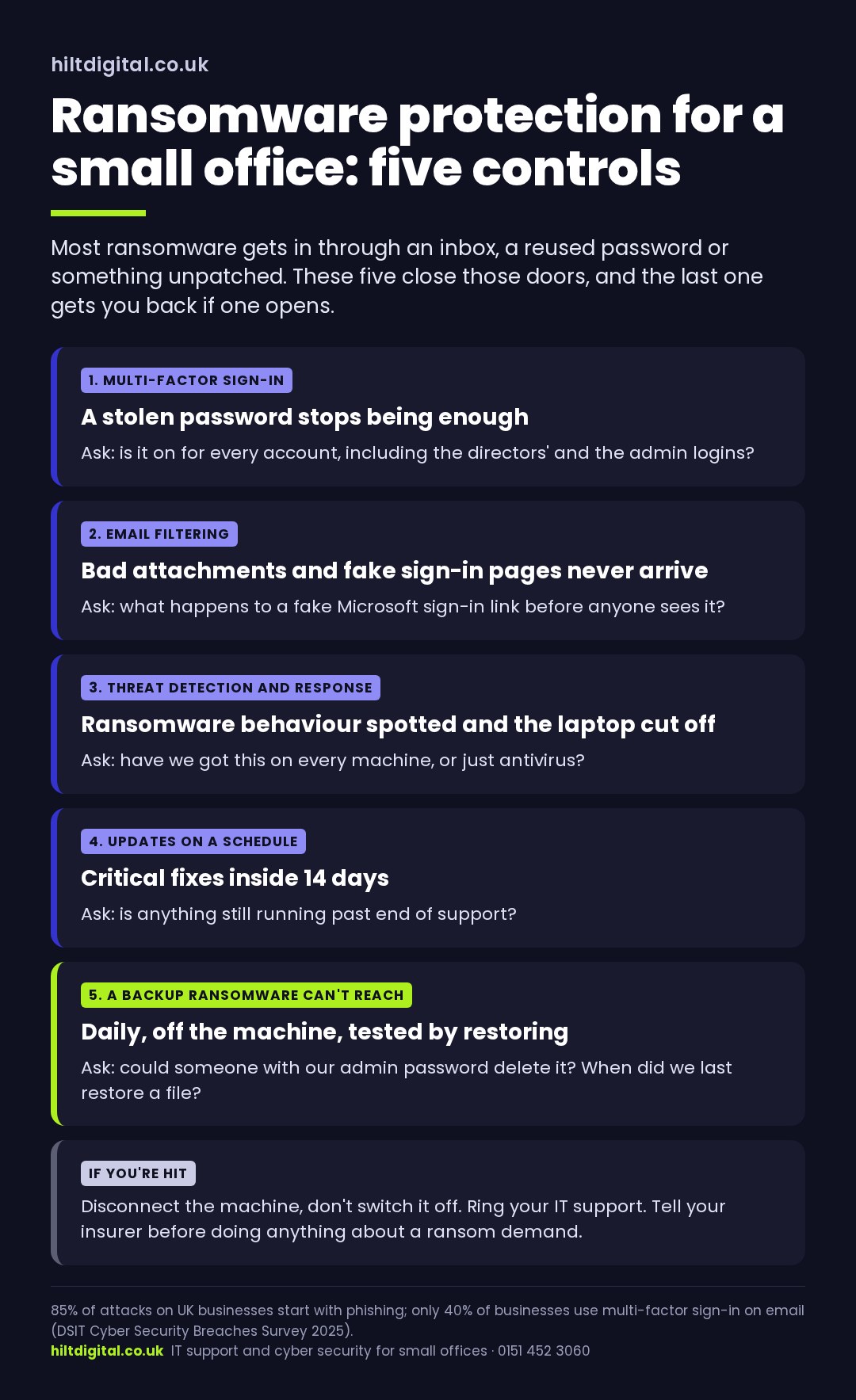
1. Multi-factor sign-in on every account
A stolen password on its own stops being enough. This one setting blocks most of the account break-ins that lead to ransomware, and it’s the first thing an insurer asks about. Only 40% of UK businesses use it on email (DSIT 2025). We also watch for staff passwords turning up in breaches, and for sign-ins that don’t look right. When one does, the account’s locked out automatically.
2. Email filtering
Malicious attachments, fake sign-in links and impersonation emails stopped before anyone reads them. Most ransomware never gets the chance to run if it never reaches an inbox.
3. Threat detection and response on every machine
This is what’s replaced plain antivirus. It watches for the behaviour of ransomware, mass file changes, credential theft, unusual tools, rather than only known viruses. When it sees it, the laptop is cut off from the network automatically before the ransomware spreads. You’ll see it called EDR. It’s the core of any modern ransomware protection.
4. Updates on a schedule
Windows, Office, browsers and the kit at the edge of your network, patched on a regular cycle, with critical fixes inside the 14 days Cyber Essentials asks for. Nothing left running past end of support.
5. A backup ransomware can’t reach
Files, email and Microsoft 365 backed up every day, off the machine, somewhere an attacker with your admin password still can’t delete. Then tested by actually restoring something. A backup nobody’s restored from is a hope, not ransomware protection.
What ransomware protection costs
All five are included in our managed IT support at £55 a person a month, every machine that person uses. So are device encryption and management, phishing practice for staff, and breached-password monitoring with automatic lock-out. Microsoft licences are billed separately. After your first year it’s rolling 30-day notice, no exit fees, and you know the whole number before you agree to anything.
Secured in 7 Days, or that month is on us.
Ransomware protection in Cheshire, the Wirral and Liverpool
Ransomware protection is remote work. The threat detection, filtering, patching and backups all run over the internet. So ransomware protection in Cheshire is the same service whether your office is in Chester, Warrington, Crewe, Macclesfield or Northwich. It’s the same again in Birkenhead or Liverpool city centre. Eric’s on the Wirral, and anything that needs a person in the room is booked in.
For guidance that isn’t selling anything, the NCSC’s guidance on mitigating malware and ransomware attacks is the best plain-English starting point. The North West Cyber Resilience Centre also publishes guidance for small businesses across Cheshire and Merseyside.
Ransomware protection: five questions for your Cheshire IT provider
- Is multi-factor sign-in switched on for every account, including the directors’ and the admin accounts?
- Have we got threat detection and response on every machine, or just antivirus?
- Where’s the backup, and could someone with our admin password delete it?
- When did anyone last restore a file from it, and does it include email?
- If we were hit on a Monday morning, what happens, who does it, and how long until we’re working again?
If the answers are vague, that’s the gap. A straight answer to all five is what good ransomware protection looks like.
What to do if you’re hit by ransomware
- Disconnect the affected machine from the network, cable and wifi. Don’t switch it off; that can destroy evidence.
- Ring whoever looks after your IT straight away.
- Report it to Report Fraud (reportfraud.police.uk, the service that replaced Action Fraud), and if personal data’s involved, consider whether you need to tell the ICO within 72 hours.
- Tell your insurer before you do anything about a ransom demand.
The NCSC’s advice is not to pay. Paying doesn’t guarantee the files come back, and it marks you as a business that pays.