Azure for small business: what it’s for, what it costs, and when you don’t need it
Short answer: Azure for a small business is usually much smaller than the sales pitch. Most small offices already get their email, files and sign-ins from Microsoft 365. Azure only earns its place for the handful of things that genuinely need a server: a line-of-business application, a database, remote desktops for software that won’t run in a browser, and off-site backup and recovery. If a quote puts more than that into Azure, ask why.
Microsoft Azure gets pitched to small businesses as “the cloud”, as if it were one decision with one price. It isn’t. It’s a menu of a few hundred services, billed by the hour, and a small business needs perhaps four of them. This is the plain version: what Azure is actually for in a small business, how the bill is shaped, when it’s the wrong answer, and who looks after it once it’s switched on.
Been quoted for Azure and not sure it adds up? Ring 0151 452 3060. Tell me what’s in the quote and I’ll tell you which parts belong in Azure, which belong in Microsoft 365, and which you can switch off.
What Azure is, and how it’s different from Microsoft 365
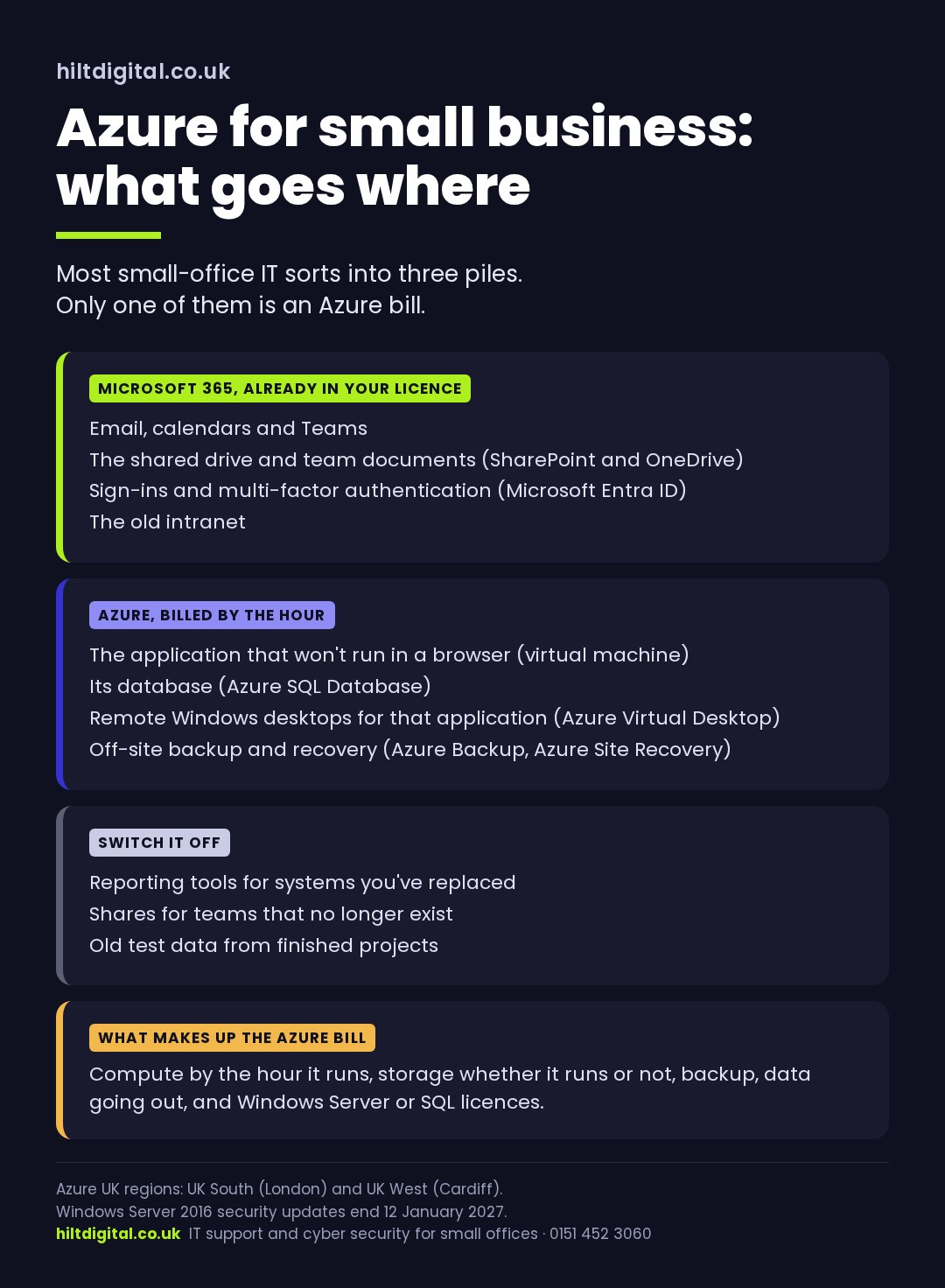
Microsoft 365 is software you rent: Outlook, Teams, SharePoint, OneDrive, Word and Excel. You pay per user per month and Microsoft runs all of it. You never see a server.
Azure is the infrastructure underneath: servers, storage, databases and networks that you rent and run yourself, or that someone runs for you. You pay for what’s switched on, by the hour, plus storage and data. You choose the size of everything, which means you can also choose it wrong.
The two overlap more than most small businesses realise. Your Microsoft 365 sign-ins already run on Microsoft Entra ID, which is the same identity service Azure uses, so the first step into Azure isn’t a leap. And plenty of what’s sold as an “Azure project” for a small business is really a Microsoft 365 job that nobody finished: a file server that should have become SharePoint years ago.
Azure has two UK regions: UK South in London and UK West in Cardiff. A small business that wants its data held in the UK can keep it there. That’s worth confirming in writing with whoever builds it, but it isn’t hard.
Five jobs Azure actually does for a small business
Strip away the menu and Azure for a small business comes down to a short list. If your situation isn’t on it, there’s a fair chance you don’t need Azure at all.
1. Running the application that won’t move to the web. A practice management system, a stock or job-costing database, an accounts package with a server component. The vendor doesn’t offer a hosted version, so it needs a Windows server somewhere. An Azure virtual machine is that server, without the cupboard, the warranty or the noise.
2. Hosting a database properly. If the application can use it, Azure SQL Database takes the patching and backups of the database off your hands. It’s usually a better buy than running SQL Server on a virtual machine. You’re paying for the database rather than for a whole server that happens to contain one.
3. Remote desktops for software that only runs on Windows. Azure Virtual Desktop lets staff use a Windows desktop and the awkward application from any laptop, at home or in the office, without the data ever leaving Azure. It’s the small business answer to “it only works when you’re in the office”.
4. Off-site backup and disaster recovery. Azure Backup keeps copies of servers and files somewhere other than the building they’re in. Azure Site Recovery goes a step further and can bring a copy of a server up in Azure if the original dies. If your only server copy lives in the same building as the server, this is the Azure service to look at first, even if nothing else moves.
5. Replacing the file server, when SharePoint really won’t do. Azure Files can stand in for a traditional mapped drive for the odd application that insists on one. It’s a narrow case. For ordinary shared documents, SharePoint and OneDrive are already in your Microsoft 365 licence and are nearly always the better answer.
When Azure is the wrong answer for a small business
Azure is a good platform. It’s also very easy to end up paying Azure rent for things that didn’t need it. It’s the wrong answer when:
- The job is files and email. That’s Microsoft 365. Moving a file server into an Azure virtual machine gives you the same file server with a monthly bill attached.
- The software vendor already offers a hosted version. If the vendor will run it for you, that’s usually cheaper and simpler than you running it in Azure.
- Nobody will look at the bill. Azure charges for what’s switched on. A virtual machine sized by guesswork and left running all weekend costs real money every month, and nothing tells you unless somebody set up budgets and alerts.
- The server is about to be replaced anyway. If the application is being retired next year, lifting it into Azure now can cost more than nursing the old box until the date.
- There’s one PC doing a server’s job. Sometimes the honest answer is a small, properly backed-up machine in the office and nothing in Azure at all.
None of that is an argument against Azure. It’s an argument for deciding what goes in it before anybody quotes for it.
Want the three piles sorted for your office? See Microsoft 365 and Azure cloud services, or Azure cloud services in Liverpool and Azure cloud support in Cheshire.
How Azure pricing works for a small business
Azure pricing has a reputation for being impossible to predict. For a small business it isn’t, as long as you know which lines exist. A typical small-business Azure bill is made of five things:
- Compute: the virtual machines and desktops, billed by the hour they’re running. A machine that’s shut down and deallocated stops costing compute, which is why small offices often switch non-essential servers off overnight and at weekends.
- Storage: the disks and files, billed whether the machine is on or off.
- Backup: charged by how much you protect and how long you keep it.
- Data going out: moving data out of Azure carries a charge. For most small offices it’s small, but it’s the line that surprises people.
- Licences: Windows Server and SQL Server licences can be included in the Azure price or brought from licences you already own. If nobody checks which you’re doing, you can end up paying twice for the same licence.
Two things bring the bill down without changing what you run. Reserved pricing commits you to a machine for one or three years in return for a lower rate, which suits a server you know you’ll need. Right-sizing means checking after a month what the machine actually uses and shrinking it, because the size picked on day one is nearly always a guess.
Microsoft’s Azure pricing calculator will price any of this. The hard part isn’t the calculator, it’s knowing what to put in it, which comes back to deciding what genuinely needs Azure first.
There are two separate numbers in any Azure job and they behave differently. The project, meaning design and the move itself, should be a fixed price with the scope written down. The running cost is monthly and permanent, and it’s the one to scrutinise. Every item that goes into Azure without needing to is a bill you’ve agreed to keep paying.
Who looks after Azure once it’s running
This is the question most small businesses never get asked, and it’s where Azure goes wrong. Once a server is in Azure, somebody still has to:
- patch it, because a virtual machine in Azure needs updates just like the one in the cupboard did;
- check the backups ran, and restore something now and then to prove they work;
- keep sign-in locked down, with multi-factor authentication on every admin account;
- read the bill each month and switch off what nobody’s using;
- keep it all set up to Cyber Essentials standards, so the answers on your next insurance or client questionnaire are true.
Microsoft looks after the datacentre. Everything inside your subscription is yours, or your IT provider’s, to look after. If a quote for Azure doesn’t say who does each of those jobs and how often, that’s the gap to ask about. A managed Azure service exists to close it.
Questions to ask before a small business moves anything to Azure
- What’s actually running on our server today, and has anyone written it down?
- Which of those things are going into Microsoft 365 rather than Azure?
- For each thing going into Azure, why does it need to be there?
- What’s the one-off project price, fixed, with the scope in writing?
- What’s the expected monthly Azure cost, line by line, and who reviews it?
- Are we bringing our own Windows Server licences, or paying for them in Azure?
- Who patches it, who checks the backups, and who reads the bill?
- Is the data held in UK South or UK West?
- How would we get our data back out if we left, and what would that cost?
Anyone who’s built Azure for a small business before can answer those plainly.
The date that’s pushing a lot of small businesses towards Azure
Windows Server 2016 stops getting security updates on 12 January 2027. Nothing breaks that day. The server carries on as before, it just never gets another security fix, and it starts failing the questions insurers and bigger customers ask.
If that date is why you’re reading about Azure, it’s a good reason to look. It’s a bad reason to move everything, because the server you’re replacing is probably doing several jobs Microsoft 365 already does. Our guide to what actually moves in a cloud migration covers how to split it.
Where to start
Start with what you’ve got, not with Azure. List what your server does, move the files and email jobs to Microsoft 365, and put only what’s left in front of the Azure pricing calculator. For most small businesses that list is short, and the Azure bill that comes out of it is a lot smaller than the first quote.
I’m Eric. I’ve spent twenty years designing cloud and security systems in regulated environments, and I’d rather tell a small business it needs less Azure than sell it more. I work with businesses across Liverpool, Wirral and Cheshire and further afield, remotely for almost all of it.
Ring 0151 452 3060 and a person picks up. If the answer is “you don’t need Azure yet”, that’s a perfectly good answer and I’ll say so.