
Email migration to Microsoft 365: what moves, what doesn’t, and how to switch without losing a day
Short answer: an email migration to Microsoft 365 is mostly a copying job that runs in the background while your team keeps working. The part people dread, the switch-over, is one DNS change, and it’s usually done on an evening or a weekend. What goes wrong is almost never the copy. It’s the things nobody listed: the old emails sitting on one person’s laptop, the scanner that sends from the old server, and the shared mailbox everyone forgot was shared.
Most offices put off moving their email to Microsoft 365 for years, because it feels like the one job that can stop the whole business. It doesn’t have to. This is how the move actually works, what comes across and what doesn’t, and the short list that makes the difference between a quiet Monday and a messy one.
Still on an Exchange server, or a mix of webmail accounts? Ring 0151 452 3060 and I’ll tell you in ten minutes which kind of move yours is and roughly how long it takes.
What an email migration to Microsoft 365 actually involves
There are four stages, and only one of them is visible to your staff.
1. The list. Every mailbox, every shared mailbox, every alias and every device or system that sends email. That last one catches people out. Scanners, alarm panels, accounts software and website forms often send through the old mail server. They stop working the day it goes.
2. The copy. Mail, calendars and contacts get copied into Microsoft 365 while everyone carries on using the old system. For a small office this can take anything from an afternoon to a few days, depending on how much old mail there is. Nobody notices it happening.
3. The switch. Your domain’s MX record gets pointed at Microsoft 365, so new email starts arriving there instead. A final top-up copy catches anything that landed during the changeover. This is the only moment that touches the business, and it’s why the switch normally happens out of hours.
4. The tidy-up. Phones and Outlook get connected to the Microsoft 365 mailboxes. The security settings go on. The old system stays read-only for a while, in case anything was missed.
What comes across, and what doesn’t
It depends on where your email lives now. Small offices usually start from one of three places, and they don’t behave the same way.
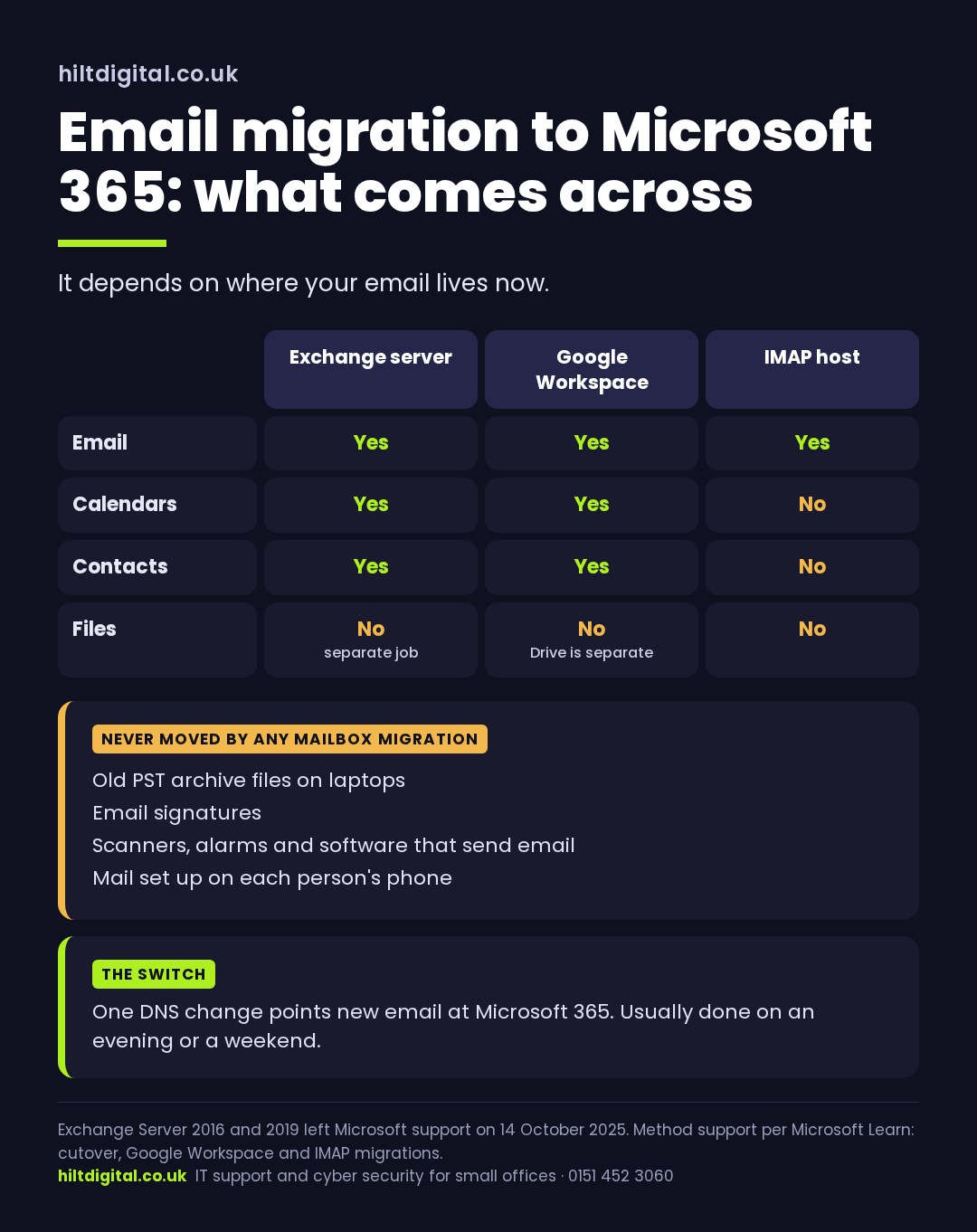
From an Exchange server in the office. Mail, calendars, contacts and tasks all come across. Microsoft’s simplest method, a cutover migration, handles up to 2,000 mailboxes, though Microsoft itself recommends it for fewer than 150, which covers almost every small office. If your Exchange server is 2016 or 2019, it’s also out of support: Microsoft stopped security updates for both on 14 October 2025, so the move is overdue rather than optional.
From Google Workspace. Mail, calendars and contacts move across using Microsoft’s own Google Workspace migration. Files in Google Drive are a separate job. They usually go into OneDrive and SharePoint, which come with Microsoft 365.
From an IMAP host. This is the “we got email with the website” setup, or a webmail provider. An IMAP migration copies the mail and nothing else. Calendars and contacts have to be exported and brought into Microsoft 365 separately. List them before you start.
Never part of any mailbox migration. Old PST archive files sitting on someone’s laptop. Email signatures. The scanner and the alarm panel. Anything set up on each person’s phone. None of these is hard to sort out. They just have to be on the list.
Email migration in Cheshire and Merseyside: how long it takes
For a typical Cheshire office of five to fifty people, moving to Microsoft 365 takes a few days end to end and one evening of actual disruption. The copying runs in the background. The switch is one change. The time goes on the list and the tidy-up, and both are faster when somebody’s done them before.
Whether you’re in Chester, Warrington, Northwich, Crewe or Liverpool, the work is the same and it’s all done remotely. Nobody needs to visit to migrate a mailbox. If a phone or a laptop needs reconnecting, that’s a few minutes on a call with the person holding it.
The thing that stretches a migration out is mail volume, not headcount. One partner with fifteen years of email in a single mailbox takes longer than ten new starters. That’s worth knowing when you’re planning the weekend.
Want somebody else to run the move? I do email migration as a fixed-price project: the list, the copy, the switch and the tidy-up, with the scope written down before anything starts. See Microsoft 365 services for what’s included, or ring 0151 452 3060.
Migrating to Microsoft 365 safely: the settings to switch on during the move
A new Microsoft 365 tenant isn’t locked down out of the box. Settings on an old Exchange server don’t carry across on their own, either. The migration is the cheapest moment to fix that, because everyone’s already expecting a change. These are the settings worth turning on before you call the move finished:
- Multi-factor sign-in on every mailbox, including the shared admin account. Only 40% of UK businesses use it on email (DSIT 2025).
- SPF, DKIM and DMARC records for your domain, so nobody else can send email that looks like it came from you.
- Admin rights kept to the people who need them, not handed to everyone so the move goes faster.
- A backup of the mailboxes. Microsoft 365 keeps deleted items for 14 days by default, or up to 30 if someone changes it. That’s a recycle bin. A proper backup is something you can restore from months later.
If you want the security side covered in more depth, the email protection page goes through it properly.
Email migration services: what to ask before you agree a quote
- Will you list every mailbox, shared mailbox, alias and device that sends email before you start?
- Which migration method suits where our email lives now, and why that one?
- What happens to the PST files on our laptops?
- When does the MX switch happen, and who’s watching it?
- Is it a fixed price, with the scope written down?
- Are multi-factor sign-in, SPF, DKIM and DMARC part of the job, or extra?
- How long is the old system kept, and who switches it off?
A provider who answers those plainly has done this before. One who can’t is guessing, and you’ll find out on the Monday.
Not sure if it’s email migration or a bigger move?
If the email lives on a server that also holds your files and an old application, the email is only part of the job. The cloud migration guide covers how to split the rest, and if you haven’t picked a plan yet, Microsoft 365 email hosting for small business explains the options.
Where to start
Write down every mailbox and every device that sends email. That one list decides how long your move to Microsoft 365 takes, and whether the Monday is quiet. If you’d rather hand the whole thing over, I’ll run it from list to tidy-up at a price agreed up front.
Based in the North West and working with offices across Cheshire and Merseyside. Ring 0151 452 3060 and a person picks up, or send a message with roughly how many mailboxes you’ve got and where they live now.