Email security for Cheshire and Liverpool businesses: the five layers, and what each one stops
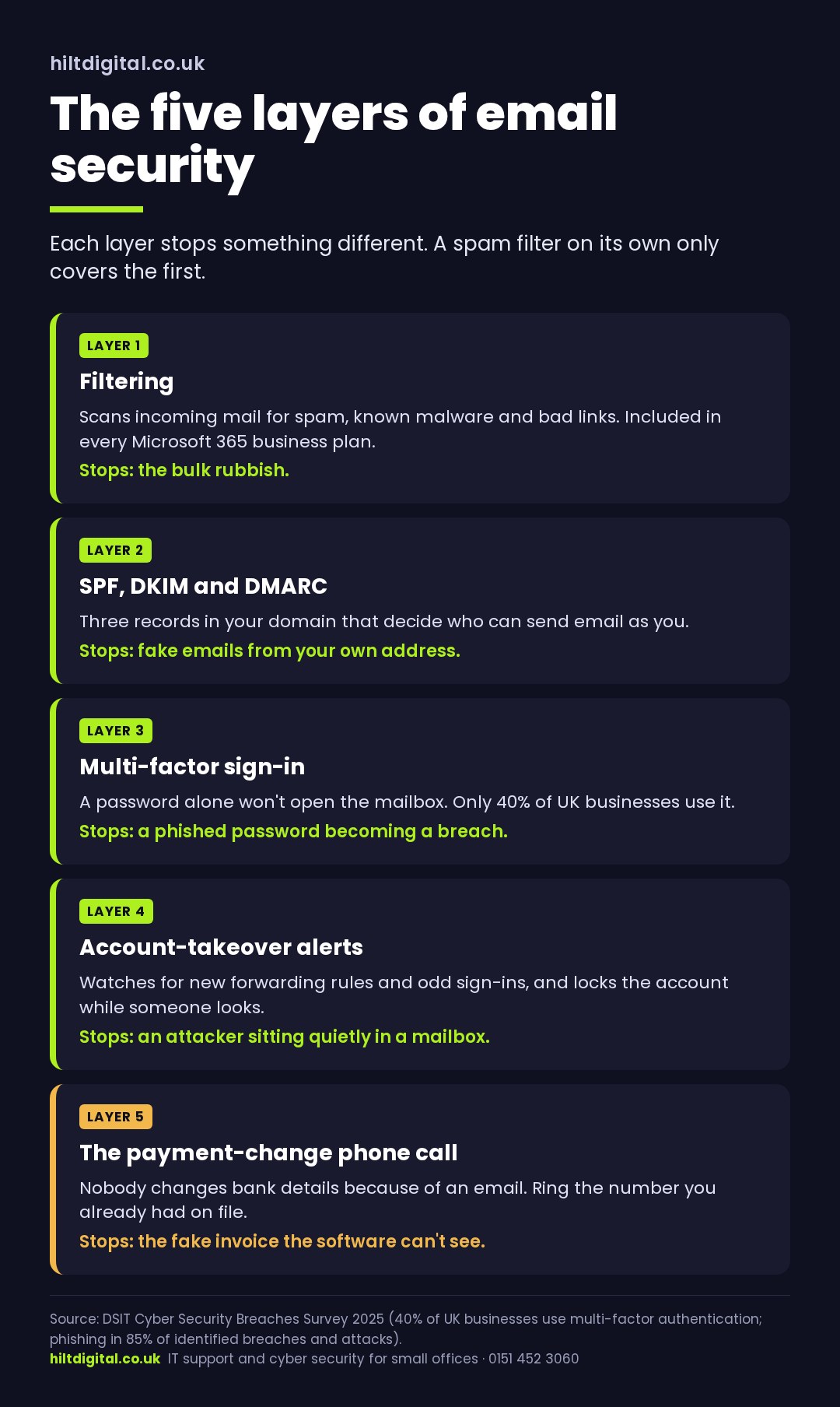
Short answer: good email security for a Cheshire or Liverpool business isn’t one product, it’s five layers that each stop a different thing: filtering, domain authentication, multi-factor sign-in, account-takeover alerts, and a payment-change check that’s done by a person. If you’ve only got the first one, the fake invoice gets in through the other four.
Email is still how most attacks start. Phishing was behind 85% of the breaches and attacks UK businesses identified last year (DSIT Cyber Security Breaches Survey 2025), and the expensive ones rarely look like spam. They look like a supplier you’ve paid before, writing from an address that’s nearly right, asking for something reasonable on a busy afternoon. Spam filters are built to catch spam. That email isn’t spam.
Not sure which of the five you’ve got? The Free Cyber Health Check looks at your email security alongside sign-ins and backups, and you get a plain-English list of what’s missing. Or ring 0151 452 3060 and ask.
Layer one: filtering, which you probably already have
If your business email runs on Microsoft 365, every business plan includes Exchange Online Protection. It scans incoming mail for spam, known malware and links to sites already reported as bad. Google Workspace does the equivalent. That’s real email security. It stops a huge volume of rubbish before anyone sees it.
What it can’t do is judge intent. Picture a polite email from a brand-new domain, with no attachment and no link, asking accounts to update a supplier’s bank details. There’s nothing in it for a filter to catch. Microsoft 365 Business Premium adds Defender for Office 365, which checks links at the moment they’re clicked and opens attachments somewhere safe first. That’s worth having. It still isn’t a reason to stop at layer one.
Layer two: stop people sending email as you
Three records in your domain’s DNS decide whether someone else can send email that claims to be from your business: SPF, DKIM and DMARC. SPF lists the services allowed to send as your domain. DKIM signs your outgoing mail so it can be checked. DMARC tells receiving servers what to do with mail that fails both, and sends you reports about who’s trying.
If your domain has SPF but no DMARC, anyone can send a convincing email to your clients from your own address, and nothing tells you it’s happening. It’s quick to check and it’s one of the cheapest pieces of email security there is. It also protects the people who trust you, which matters when a Cheshire accountancy practice or a Liverpool law firm is the name on the fake invoice.
Layer three: a stolen password shouldn’t be enough
Multi-factor sign-in means a password alone won’t open a mailbox. Only 40% of UK businesses use it (DSIT Cyber Security Breaches Survey 2025), and it’s the single control that turns a phished password from a breach into a non-event. It needs to be on every mailbox, including the shared ones, the old accounts of people who’ve left, and the director’s, especially the director’s.
Layer four: notice when a mailbox has been taken over
When an attacker gets into a mailbox they don’t usually announce it. They sit and read. A common pattern is a new inbox rule that forwards anything containing “invoice” or “payment” to an outside address, or quietly moves replies into a folder nobody opens. Then, at the right moment, they reply to a real thread with new bank details.
Account-takeover monitoring watches for exactly that: new forwarding rules, sign-ins from somewhere odd, a mailbox suddenly sending hundreds of messages. The useful version doesn’t just raise an alert, it locks the account automatically while someone looks. That’s the difference between finding out on Friday afternoon and finding out from a client three weeks later.
Layer five: the check no software does for you
Every one of the four layers of email security above can be beaten by a good enough email on a bad enough day. The last layer is a rule, not a product: nobody changes a supplier’s or a client’s bank details because of an email. They ring the number they already had on file, not the one in the email, and confirm it. Write it down, tell everyone who touches payments, and make it fine to slow down a payment to check.
That one rule closes the gap the technology can’t. It costs nothing and it’s the part of email security people skip because it feels too simple to matter.
Want the layers set up and looked after? Email filtering, multi-factor sign-in, phishing practice for your team, and account-takeover alerts with automatic lock-out are all part of IT support from £55 a person a month, with backups, updates and monitoring. We check your domain records when you start. Microsoft licences are billed separately.
Email security services in Cheshire and Liverpool: what to ask a provider
If you’re a Cheshire business comparing email security services, ask these. They sort the providers who set it up properly from the ones who switch on a filter and stop:
- Is multi-factor sign-in on every mailbox, including shared and leavers’ accounts? How do you know?
- Have our SPF, DKIM and DMARC records been checked, and is DMARC set to do anything yet?
- If someone creates a forwarding rule in a mailbox tonight, who finds out, and when?
- Does a suspicious sign-in lock the account automatically, or does it wait for a person?
- When did our team last get a practice phishing email, and what happened?
- If a real one gets through, what’s the plan, and who rings whom?
A provider who answers those plainly has done the work. Vague answers about “advanced threat protection” usually mean layer one and nothing else.
When one gets through anyway
Good email security lowers the odds. It doesn’t make them zero, and the first hour after someone clicks matters more than anything before it. If you think a mailbox has been compromised:
- Reset the password and sign the account out of every session, so a stolen sign-in stops working.
- Check the mailbox for inbox rules and forwarding you didn’t create, and remove them.
- If money has moved, ring your bank straight away. Speed matters for any chance of recall.
- Report it to Report Fraud (reportfraud.police.uk, the service that replaced Action Fraud). If personal data may have been exposed, you may need to report to the ICO within 72 hours under UK GDPR.
- Warn the clients and suppliers who might receive a follow-up email that looks like it came from you.
The NCSC’s small business guidance covers the same ground and is worth reading whoever looks after your email.
Email security for Cheshire businesses, handled remotely
Email security is almost all done remotely. So it doesn’t matter whether your office is in Chester, Warrington, Macclesfield, anywhere else in Cheshire, or the middle of Liverpool. We set up your email security through your Microsoft 365 admin, check the domain records, switch on the monitoring, and look after it from there. We work to the NCSC’s frameworks and run to Cyber Essentials standards, and the person who sets it up is the person you speak to when something looks wrong.
If your Cheshire business has a filter and not much else, that’s the normal starting point and it’s quick to fix.
Ring 0151 452 3060 and a person picks up, or request the Free Cyber Health Check and you’ll see exactly which of the five layers you’ve got and which you haven’t.